Introduction





cottage is a GitOps tool for teams to manage age-encrypted secrets in git repositories.
It provides a simple workflow to encrypt/decrypt secrets, manage recipients, and keep secrets out of the repo while still allowing for easy sharing via VCS. cottage also generates redacted previews of encrypted secrets for better visibility and supports both persistent and temporary decryption workflows, while ensuring secrets are never committed in plaintext.
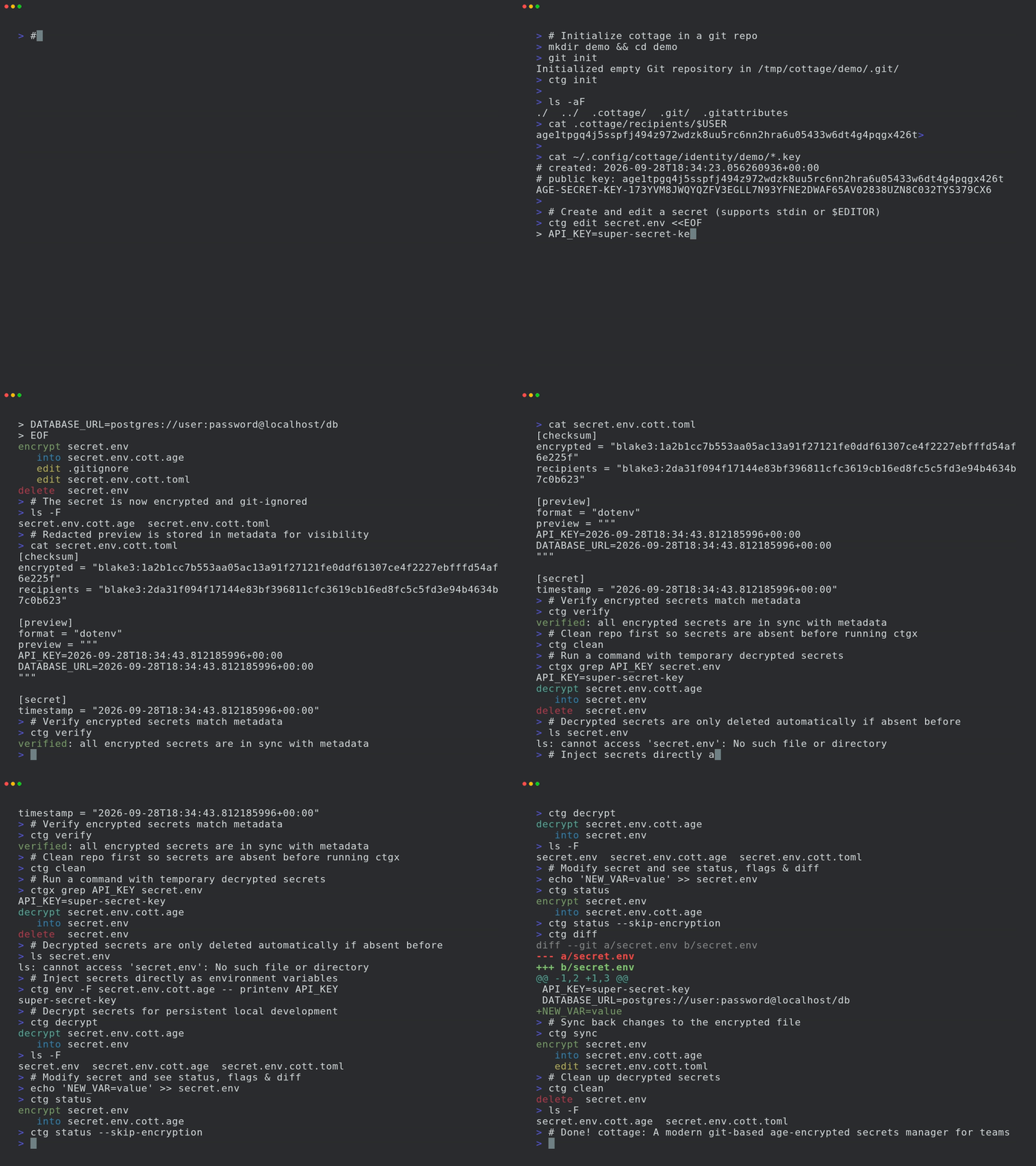
- Features
- Installation
- Editor Integrations
- AI Agent Integrations
- Quick Start
- GitOps
- Git Hooks
- Access Control
- Any Provider as Upstream
- Sync with any device
- Learn More
- Troubleshooting
- Comparison
Features
- Exposure-safe: Uses Rust’s type system to make sure bugs can never accidentally expose secrets.
- Team-friendly: Share public keys (recipients) in the repo, keep private keys (identities) local.
- Access Control: Simple allow/deny rules to control which secrets are encrypted for which recipients.
- Manages .gitignore: Automatically updates
.gitignoreto keep unencrypted secrets out of the repo. - Previews: Generates timestamped redacted previews of encrypted secrets for better visibility.
- Rich diffs: Keeps git diff clean & reviewable, while
ctg diffshows diff of locally modified secrets with tracked encrypted counterparts. - Checksum verification: Prevents tampering by verifying that encrypted secrets and recipient lists match the metadata.
- Git hooks: Easily set up git hooks to automatically check/encrypt secrets before commit and decrypt them after checkout.
- Persistent secrets workflow:
ctg decrypt/synckeeps decrypted secrets on disk. - Smart cleanup lifecycle:
ctg run(shortcutctgx) andctg editdecrypt secrets before the operation, keeping them on disk if already present beforehand or automatically cleaning them up afterwards if they were not. - Clean on completion:
ctg encrypt --clean,ctg run --clean, andctg edit --cleanensure that decrypted files are cleaned up from disk even if they were present before. - Environment injection workflow:
ctg envinjects decrypted secrets as environment variables to run a command, without writing them to disk at all. - Secure secret piping:
ctg cat PATHdecrypts in memory and prints to stdout for direct stdin piping to other tools. - Clean up:
ctg cleandeletes all decrypted secrets from local repo to let you run your AI agents with a tiny bit less worry. - Supports jj and non-git directories:
ctg initturns any directory into a secret store. - Sync with any provider: Lets you configure any provider with an API as the upstream, and start using
ctg pull/diff/pushlikegit pull/diff/push. - Sync with any device: Secrets encrypted with cottage and managed in a git repo can be synced across devices with Cottage Sync.
Installation
# rust: cargo-binstall/cargo
cargo binstall --locked cottage
cargo install --locked cottage

# python: pip/uv/uvx
pip install cottage
uv pip install cottage
uvx --from cottage ctg --version

# node: yarn/pnpm/npx
yarn global add @sayanarijit/cottage
pnpm add -g @sayanarijit/cottage
npx -p @sayanarijit/cottage ctg --version
Also available as docker images:
# Docker
docker run --rm -v $PWD:/app sayanarijit/cottage --version

# Podman
podman run --rm -v $PWD:/app quay.io/sayanarijit/cottage --version
Or download the latest release from GitHub.
Editor Integrations
VS Code Extension
Use the Cottage VS Code extension to install ctg, add Copilot safety hooks, encrypt files from the Explorer, and open .cott.age files through the editor workflow.
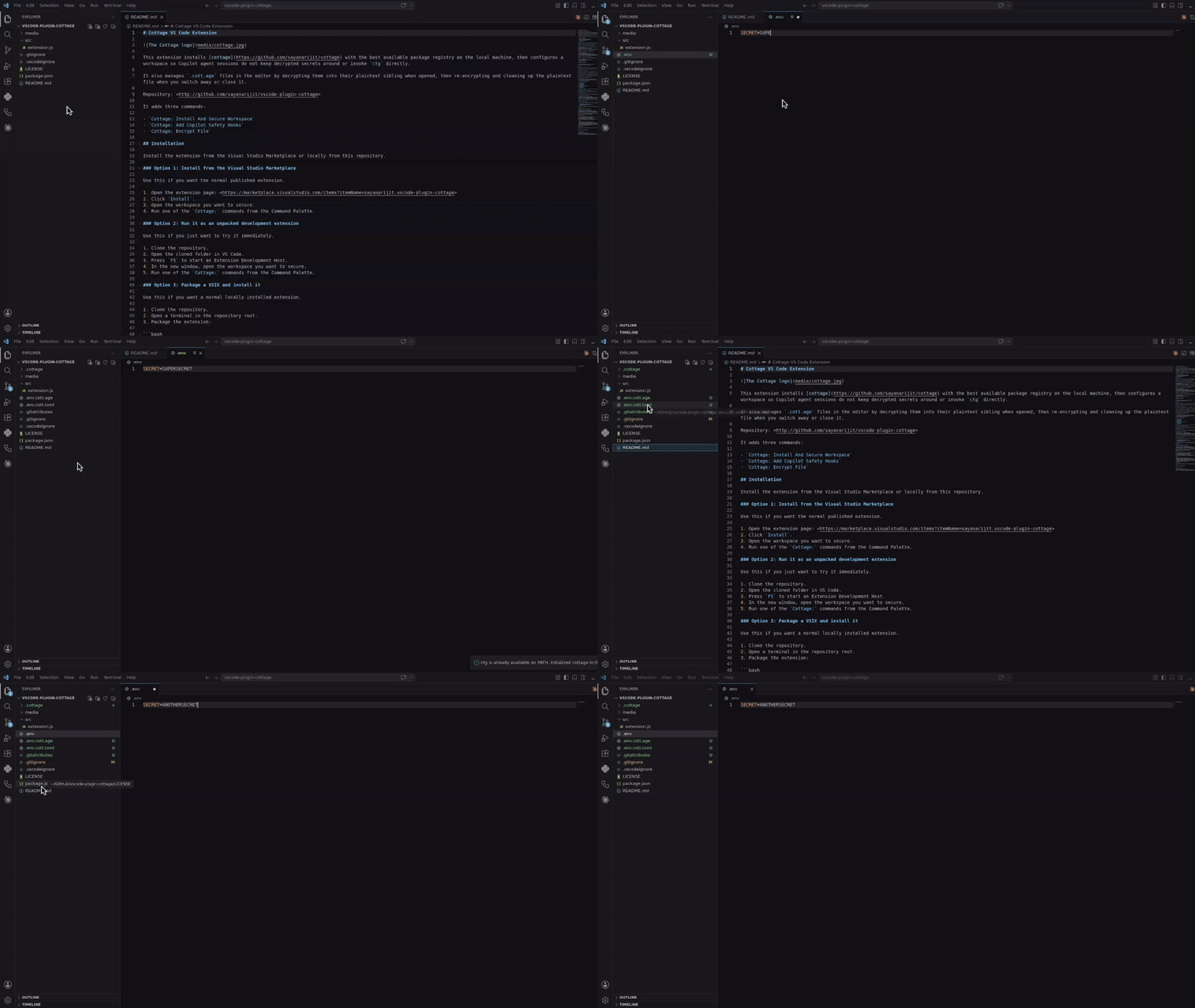
Install it from the Visual Studio Marketplace, or build and install it locally from vscode-plugin-cottage.
Cursor and Eclipse Extension
Download the VSX file and install it in your Cursor or Eclipse IDE. It works similar to the VS Code extension.
Vim Plugin
Use the cottage.vim plugin to encrypt/decrypt secrets from Vim or Neovim.
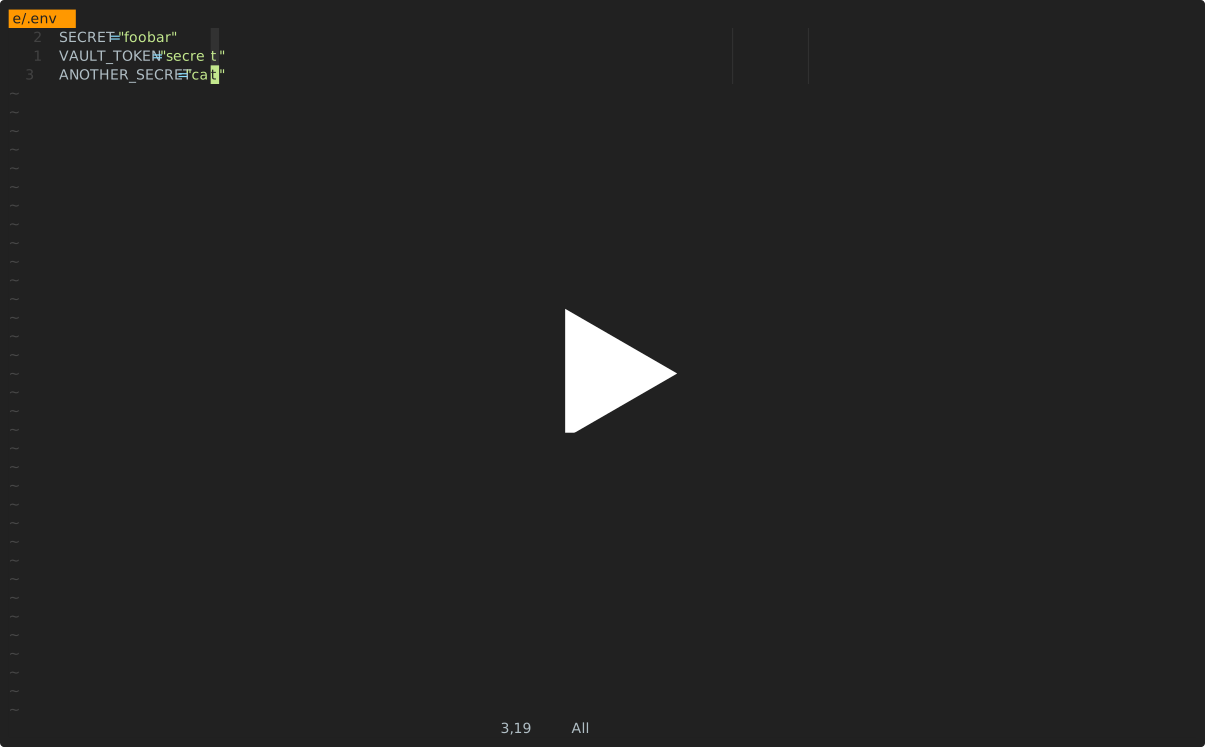
AI Agent Integrations
All of the integrations below keep AI agents from running ctg/ctgx directly and from viewing or editing secret files: anything inside .cottage/, any *.cott.* file (encrypted *.cott.age blobs and redacted *.cott.toml previews), and any decrypted file that still has a *.cott.age counterpart on disk.
Claude Code Integration
If you are using Claude Code, add .claude/settings.json and .claude/hooks/deny-secrets.py to your repos with secrets so Claude Code sessions handle secrets safely, or install the claude-plugin-cottage plugin.
GitHub Copilot Integration
If you are using GitHub Copilot in VS Code, add .github/hooks/ctg-policy.json and .github/hooks/scripts/deny_ctg_command.py to your repos with secrets so Copilot sessions clean decrypted files, block direct ctg shell commands, and block access to secret files, or install the vscode-plugin-cottage extension to set that up from VS Code.
VS Code loads .claude/settings.json hook definitions too. If you keep both Claude and Copilot hook files in the same repo, make sure you do not accidentally run the same cleanup hook twice.
Codex Integration
If you are using Codex, add .codex/hooks.json and .codex/hooks/deny-ctg.py to your repos with secrets so Codex sessions handle secrets safely, or install the codex-plugin-cottage plugin.
Codex requires local hooks to be reviewed before they run. After adding the files, start Codex in the repo and use /hooks to review and trust the project hooks.
Antigravity (agy) Integration
If you are using Antigravity (agy), add .agents/hooks.json and .agents/scripts/deny-ctg.py to your repos with secrets so Antigravity sessions handle secrets safely, or install the agy-plugin-cottage plugin.
Cursor Integration
If you are using Cursor, add .cursor/hooks.json, .cursor/hooks/deny-ctg.py, .cursor/hooks/deny-read-secrets.py, .cursor/rules/deny-ctg.mdc, and .cursorignore to your repos with secrets so Cursor sessions handle secrets safely.
Cursor requires hooks to be enabled first. Open Cursor Settings > Hooks and enable hooks, then restart the agent session so the project hooks take effect. .cursorignore additionally keeps secret files out of Cursor’s indexing and the Agent’s context.
Quick Start
Init project:
mkdir project && cd project

git init  # Optional, cottage works better with git but it's not required
ctg init  # Sets up the .cottage directory and necessary files

tree -a
# .
# ├ .cottage/           <- Auto-generated by `ctg init`
# │ └ recipients/     <- This is where your team keeps the public keys of all the recipients.
# │     └ sayanarijit <- Your public key. Commit it. To use an existing public key, just copy that key here.
# ├ .git/...
# └ .gitattributes      <- Added `*.cott.age binary linguist-generated filter=cottage-encrypted -diff` to avoid polluting git diff

# Your private key is stored safely in `~/.config/cottage/identity/<dirname>/<timestamp>.key`.
# You can run `ctg clean --all` anytime to clean up everything cottage ever did.
Create or edit a secret:
# `ctg edit` decrypts the file before opening in $EDITOR and re-encrypts upon save.
# If the decrypted file was not present on disk before running `ctg edit`, it is cleaned up afterwards.
# If it was already present, it is kept on disk.
ctg edit secret.yml

# Use `--clean` with `ctg edit` or `ctg encrypt` to ensure decrypted files are deleted even if present before
ctg edit secret.yml --clean    # Opens in $EDITOR, encrypts on save, and cleans up
ctg encrypt secret.yml --clean # Encrypts secret.yml and cleans up
# encrypt secret.yml
#    into secret.yml.cott.age
#    edit secret.yml.cott.toml
#    edit .gitignore
# delete secret.yml
Run a command with decrypted secrets:
cat secret.yml
# cat: secret.yml: No such file or directory

# `ctg run` (or shortcut `ctgx`) decrypts secrets before running the command.
# If the decrypted files were not present on disk beforehand, they are automatically cleaned up after the command finishes.
# If they were already present beforehand, they are kept on disk.
ctg run -- kubectl apply -f secret.yml          # decrypts secret.yml.cott.age to secret.yml and runs the command
ctg run -- kubectl apply -f secret.yml.cott.age # also replaces the path argument with the decrypted file path
ctg run -- kubectl apply -f .                   # decrypts all .cott.age files in . and runs the command
ctg run -- ./deploy.sh                          # decrypts all .cott.age files in repo and runs the command

cat secret.yml
# cat: secret.yml: No such file or directory

# Use `--clean` to ensure decrypted files are cleaned up even if they were present before
ctg run --clean ./deploy.sh
Or use the shortcut:
ctgx -- ./deploy.sh
ctgx --clean -- ./deploy.sh
Read and pipe a decrypted secret without writing it to disk:
ctg cat secret.yml.cott.age
ctg cat secret.yml | kubectl apply -f -
ctg cat .env.prod | docker run --rm --env-file /dev/stdin my-image:latest
Run a command with secrets injected as environment variables, without writing to disk at all:
ctg env -- ./deploy.sh # Export secrets from .env.cott.age (default) without writing them to disk, then run deploy.sh
ctg env -F .env.prod.cott.age -- ./deploy.sh # exports from .env.prod.cott.age instead of .env.cott.age
ctg env -F secrets.json.cott.age -- printenv COTTAGE_SECRET # Also supports non-dotenv files.
GitOps
To share your secrets with team members, just push to the git repo.
git add .
git commit -m "Add secret.yml"
git push origin main
Ask your teammates to add their public keys to .cottage/recipients and push the
changes. Then you can pull and re-encrypt the secrets for them.
git pull origin main

ctg decrypt --skip-verify-recipients  # Decrypt missing secrets for re-encryption
ctg encrypt                           # Re-encrypt all secrets
# encrypt secret.yml
#    into secret.yml.cott.age
#    edit secret.yml.cott.toml

ctg clean  # optional
# delete secret.yml

# review changes, commit and push
git add .
git commit -m "Add new recipient to secrets"
git push origin main
Now your teammates can pull the latest changes and decrypt secrets for themselves.
Git Hooks
You can use prek or pre-commit to set up git hooks to automatically check/encrypt secrets before commit and decrypt them after checkout.
See the example prek configuration here.
After adding the prek.toml file, run:
prek install
prek install --hook-type post-checkout
prek install --hook-type post-merge
prek install --hook-type post-rewrite
Access Control
Rules
In the metadata file, you can annotate which recipients the secret should be encrypted for. This allows you to have different secrets for different environments (e.g. staging vs production) and only encrypt them for the relevant recipients.
# secret.yml.cott.toml
[secret]
allow = ["sayanarijit"]  # Only encrypt for sayanarijit
# secret.yml.cott.toml
[secret]
deny = ["sayanarijit"]  # Encrypt for everyone except sayanarijit
# secret.yml.cott.toml
[secret]
allow = ["env/staging/*"]  # Supports glob patterns, only encrypt for recipients in env/staging
deny = ["env/staging/badservice"]  # Encrypt for everyone in env/staging except badservice
Deny rules take precedence over allow rules.
See metadata specification for more details.
Verification
You can run ctg verify in CI to verify that the encrypted secrets and recipient lists match the metadata rules, to prevent tampering.
# .github/workflows/cottage-verify.yml
name: Cottage Verify
on: [push, pull_request]
permissions:
  contents: read
jobs:
  verify-secrets:
    runs-on: ubuntu-latest
    steps:
      - uses: actions/checkout@v3
      - name: Verify secrets
        run: docker run --rm -v "${{ github.workspace }}:/app" ghcr.io/sayanarijit/cottage verify
Any Provider as Upstream
With cottage, you can sync secrets with any provider that has an API, not just git.
For that, create a file named cottage.toml in the project root and configure the upstream settings.
See the example cottage.toml here and the secret specific upstream configuration here.
See an example plugin implementation here.
The workflow is similar to git, but instead of git pull and git push, you run ctg pull and ctg push to sync secrets with the configured upstream.
Example:
# Pull latest changes into local encrypted secrets
# Similar to `git pull origin`
ctg pull myvault

# Compare diff with local decrypted secrets
ctg diff

# Sync local decrypted secrets with local encrypted secrets
ctg sync

# Push changes from local encrypted secrets to upstream
# Similar to `git push origin main`
ctg push myvault
See upstream configuration specification for more details.
Example plugins
Cottage supports various plugin providers to sync your secrets. Ready-to-use plugin scripts are available in the examples/plugins directory:
- 1Password
- AWS Secrets Manager
- Azure Key Vault
- Bitwarden
- Dashlane
- Doppler
- ejson
- GitHub Secrets
- Google Cloud Secret Manager
- HashiCorp Vault (also see Vault in Kubernetes)
- Keeper Security
- KeePass (Passhole)
- LastPass
- pass (password-store)
- Proton Pass
- System Keyring
- Zoho Vault
Sync with any device
Use Cottage Sync to sync your secrets across your devices and browse without needing the CLI.
Learn More
See examples directory for more usage examples.
Troubleshooting
# See debug logs with -v, -vv or -vvv
ctg run -vvv -- ./deploy.sh
Comparison
age vs Other Encryption
age uses a modern, simple algorithm optimized for secure file encryption, with a focus on usability and minimal attack surface. It also supports SSH RSA and Ed25519 keys, though it’s recommended to use different keys for separate purposes and scopes.
cottage vs SOPS
While SOPS and cottage have many overlapping features, cottage has the following advantages:
- Auto manage .gitignore to ensure unencrypted secrets are never committed to git.
- Encrypted secrets being pure age encrypted .age files, allows for better interoperability with a wider ecosystem of tools.
- Cleaner diffs - unlike SOPS, which generates diffs for every value of every secret, even if the actual change is just adding/removing a recipient, cottage only generates one diff per file, explicitly pointing out the change in recipients checksum.
cottage vs dotenvx
cottage borrows the ctg env API from dotenvx.
- Supports any file type, not just dotenv files.
- Manages multiple secrets in a repo.
- Access control rules to encrypt secrets for specific recipients.
- Cleaner diffs - see cottage vs SOPS.
cottage vs agebox
agebox is very similar to cottage in core philosophy but lacks many features.
Initializing cottage
Scenarios for initializing cottage in a new or existing git repository:
- I want to create a fresh new git repo and keep secrets in it
- I want to add cottage to an existing git repo
- I want to undo ctg init
I want to create a fresh new git repo and keep secrets in it
To start a fresh new repo with secrets, run:
cd /tmp
mkdir myproject
cd myproject
git init

ctg init
Initialized empty Git repository in /tmp/tmp....XXX.../.git/
To confirm that the repository is properly initialized, run:
git status --short?? .cottage/ ?? .gitattributes
Check the contents in the .cottage directory:
tree .cottage.cottage └── recipients └── ...XXX... 1 directory, 1 file
The private key is stored safely in ~/.config/cottage/identity/myproject/<timestamp>.key.
Check the contents of .gitattributes:
cat .gitattributes*.cott.age binary linguist-generated filter=cottage-encrypted -diff
I want to add cottage to an existing git repo
To add cottage to an existing git repository (e.g. sayanarijit/jf), run:
git clone git@github.com:sayanarijit/jf.git
cd jf

ctg init
To confirm that the repository is properly initialized, run:
git status --short?? .cottage/ ?? .gitattributes
tree .cottage.cottage └── recipients └── ...XXX...
The private key is stored safely in ~/.config/cottage/identity/jf/<timestamp>.key.
To confirm that .gitattributes is properly updated, run:
grep .cott.age .gitattributes*.cott.age binary linguist-generated filter=cottage-encrypted -diff
I want to undo ctg init
For some reason, if you want to undo the ctg init command, you can run:
ctg clean --all

git status --short
# no output
Setting up keys
Scenarios for configuring keys for a new or existing git repository:
- I want to create a new key pair for a new project
- I want to use the same key across multiple projects
- I want to use my existing SSH key pair
- I want to generate or re-generate a new key pair in an existing project
I want to create a new key pair for a new project
Important
Starting from version 0.8, cottage generates and expects private keys outside of the project repository.
When you run ctg init or ctg keygen:
- The private key is stored in
~/.config/cottage/identity/<dirname>/<timestamp>.key(where<dirname>is the project root directory name). - The public key is stored in
.cottage/recipients/<username>.
When searching for default private keys, cottage resolves keys in the following order:
- If
~/.config/cottage/identity/<dirname>is present, it loads all keys from that directory. - Otherwise, if the parent directory
~/.config/cottage/identityis present, it loads all keys from it recursively. - Otherwise, if
~/.sshis present, it loads all keys from~/.ssh.
You can also pass explicit private key files or identity strings using the -i / --identity flag or the COTTAGE_IDENTITY environment variable.
I want to use the same key across multiple projects
If you want to share a key across multiple projects, you can place the private key directly in the parent directory ~/.config/cottage/identity/ (e.g. ~/.config/cottage/identity/global.key).
When a project doesn’t have a project-specific directory ~/.config/cottage/identity/<dirname>, cottage will automatically load keys from ~/.config/cottage/identity/ recursively.
I want to use my existing SSH key pair
Warning
While
cottagesupports using your existing SSH keys (e.g., the ones you use for Git authentication), it is highly recommended to maintain separation between keys used for different scopes and purposes.
If you already have an SSH key pair1, you can use it with cottage by copying your public key to the .cottage/recipients directory:
cp -v ~/.ssh/id_rsa.pub .cottage/recipients/$USER
If no project-specific identity directory ~/.config/cottage/identity/<dirname> or global ~/.config/cottage/identity exists, cottage will automatically fall back to loading keys from ~/.ssh/. Alternatively, you can explicitly point to your SSH private key using -i ~/.ssh/id_rsa.
I want to generate or re-generate a new key pair in an existing project
If you are setting up keys in an existing cottage project, or want to re-generate existing keys, you can run the ctg keygen command:
ctg keygen
By default, this generates a key pair where the recipient public key file is named after your system username (i.e., $USER), and the private key is placed in ~/.config/cottage/identity/<dirname>/<timestamp>.key.
You can customize the name of the public key file in .cottage/recipients/ using the -n or --name option:
ctg keygen -n myname
To force re-generation of the key pair and overwrite any existing keys for the project, use the --force option:
ctg keygen -n myname --force
-
(cott)age is compatible with RSA and Ed25519 keys that are generated without passphrase. You can always generate a new SSH (e.g. RSA) key using
ssh-keygen(e.g.ssh-keygen -t rsa) to use with cottage. ↩
Encrypting Secrets
Scenarios for encrypting and editing new or existing secrets:
- I want to create a new encrypted file
- I want to encrypt an existing cleartext file
- I want to re-encrypt all secrets in the current directory
- I want to edit an existing secret with automatic cleanup or retention
- I want the cleartext secret deleted after encryption or editing
I want to create a new encrypted file
There are many ways to create a new encrypted file. The simplest way is to use the ctg encrypt command:
cat > secret1.env <<EOF
DB_PASSWORD=supersecret
EOF

ctg encrypt secret1.env
encrypt secret1.env into secret1.env.cott.age edit .gitignore edit secret1.env.cott.toml
# ctg edit secret2.env  # This will open the file in $EDITOR

# But you can also provide the content using stdin
ctg edit secret2.env <<EOF
DB_PASSWORD=supersecret
EOF
edit secret2.env into secret2.env.cott.age edit .gitignore edit secret2.env.cott.toml
Let’s verify what it did:
ls -1secret1.env secret1.env.cott.age secret1.env.cott.toml secret2.env secret2.env.cott.age secret2.env.cott.toml
cat .gitignore/secret1.env /secret2.env
cat secret1.env.cott.toml[checksum] encrypted = "blake3:...XXX..." recipients = "blake3:...XXX..." [preview] format = "dotenv" preview = """ DB_PASSWORD=XXXX-XX-XXTXX:XX:XX.XXXXXXXXX+00:00 """ [secret] timestamp = "XXXX-XX-XXTXX:XX:XX.XXXXXXXXX+00:00"
cat secret1.env.cott.ageage-encryption.org/v1 ...XXX...
I want to encrypt an existing cleartext file
Same as above.
I want to re-encrypt all secrets in the current directory
Just run ctg encrypt without any file argument to encrypt files that require encryption:
ctg encrypt
# There is no change, so the encryption will be skipped
To force re-encryption, add --force flag:
ctg encrypt --forceencrypt secret1.env into secret1.env.cott.age edit secret1.env.cott.toml encrypt secret2.env into secret2.env.cott.age edit secret2.env.cott.toml
I want to edit an existing secret with automatic cleanup or retention
ctg edit decrypts the secret before opening it in $EDITOR (or reading stdin) and re-encrypts upon save:
- If the cleartext file was already present on disk:
ctg editkeeps the cleartext file after saving and re-encrypting. - If the cleartext file was not present on disk (only
.cott.agewas tracked):ctg editdecrypts it temporarily for editing, re-encrypts, and then automatically cleans up (deletes) the cleartext file.
I want the cleartext secret deleted after encryption or editing
Just add --clean flag to the ctg encrypt or ctg edit command. The --clean flag ensures that the decrypted cleartext file is deleted even if it was present on disk before running the command:
ctg edit --clean secret1.env <<EOF
DB_PASSWORD=editedsecret
EOF
encrypt secret1.env into secret1.env.cott.age edit secret1.env.cott.toml delete secret1.env
If there is no change, re-encryption will be skipped, but the cleartext file will still be deleted:
ctg encrypt --clean secret2.envdelete secret2.env
But the entries in .gitignore will still remain:
cat .gitignore/secret1.env /secret2.env
Syncing with Git
Scenarios for syncing secrets with git:
I want to push the encrypted secrets to git
First, let’s check the uncommitted changes we have in our local repo:
git status --short?? .cottage/ ?? .gitattributes ?? .gitignore ?? secret1.env.cott.age ?? secret1.env.cott.toml ?? secret2.env.cott.age ?? secret2.env.cott.toml
Let’s create a new bare git repo and call it upstream:
mkdir -p /tmp/upstream.git
(cd /tmp/upstream.git && git init --bare)
Initialized empty Git repository in /tmp/upstream.git/
Now let’s add the upstream to our local repo and push the encrypted secrets:
git remote add origin /tmp/upstream.git
git add .
git commit -m "Add encrypted secrets"
git push origin main
[main (root-commit) XXXXXXX] Add encrypted secrets 7 files changed, 29 insertions(+) create mode 100644 .cottage/recipients/...XXX... create mode 100644 .gitattributes create mode 100644 .gitignore create mode 100644 secret1.env.cott.age create mode 100644 secret1.env.cott.toml create mode 100644 secret2.env.cott.age create mode 100644 secret2.env.cott.toml Enumerating objects: 11, done. Counting objects: 100% (11/11), done. Delta compression using up to 20 threads Compressing objects: 100% (8/8), done. Writing objects: 100% (11/11), X.XX KiB | X.XX MiB/s, done. Total 11 (delta 1), reused 0 (delta 0), pack-reused 0 (from 0) To /tmp/upstream.git * [new branch] main -> main
I want to pull the encrypted secrets from git
Let’s clone the upstream repo to a new directory and check the contents:
cd /tmp
git clone /tmp/upstream.git myproject-clone
cd myproject-clone
ls -A
Cloning into 'myproject-clone'... done. .cottage .git .gitattributes .gitignore secret1.env.cott.age secret1.env.cott.toml secret2.env.cott.age secret2.env.cott.toml
Adding Recipient and Decrypting
Scenarios for adding recipient and decrypting secrets:
- I want to decrypt secrets in the cloned repository
- I got a checksum mismatch error when decrypting secrets
- I want to run a command with decrypted secrets (ctg run / ctgx)
- I want to ensure decrypted secrets are cleaned up after running a command (ctg run –clean)
I want to decrypt secrets in the cloned repository
Let’s try to decrypt secrets in the cloned repository:
cd /tmp/myproject-clone
ctg decrypt
Error: No matching keys found
Right… You need to set up your keys first. Let’s add keys first.
ctg keygen -n newuser

tree .cottage
.cottage └── recipients ├── newuser └── sayanarijit
Let’s commit and push the changes to the remote repository, so that someone with access (admin) can pull the changes and re-encrypt the secrets for the new key:
git add .cottage/recipients/newuser
git commit -m "Add new recipient key"
git push origin main
[main XXXXXXX] Add new recipient key 1 file changed, 1 insertion(+) create mode 100644 .cottage/recipients/newuser Enumerating objects: 8, done. Counting objects: 100% (8/8), done. Delta compression using up to 20 threads Compressing objects: 100% (4/4), done. Writing objects: 100% (5/5), X.XX KiB | X.XX MiB/s, done. Total 5 (delta 1), reused 0 (delta 0), pack-reused 0 (from 0) To /tmp/upstream.git XXXXXXX..XXXXXXX main -> main
Now admin should pull the changes and re-encrypt the secrets for the new key.
cd /tmp/myproject
git pull origin main
remote: Enumerating objects: 8, done. remote: Counting objects: 100% (8/8), done. remote: Compressing objects: 100% (4/4), done. remote: Total 5 (delta 1), reused 0 (delta 0), pack-reused 0 (from 0) Unpacking objects: 100% (5/5), X.XX KiB | X.XX MiB/s, done. From /tmp/upstream * branch main -> FETCH_HEAD XXXXXXX..XXXXXXX main -> origin/main Updating XXXXXXX..XXXXXXX Fast-forward .cottage/recipients/newuser | 1 + 1 file changed, 1 insertion(+) create mode 100644 .cottage/recipients/newuser
ctg decrypt --force && ctg encryptdecrypt secret1.env.cott.age into secret1.env decrypt secret2.env.cott.age into secret2.env encrypt secret1.env into secret1.env.cott.age edit secret1.env.cott.toml encrypt secret2.env into secret2.env.cott.age edit secret2.env.cott.toml
Note
The
--forceflag is used to bypass the checksum verification when decrypting secrets. This is necessary when adding a new recipient key, because the encrypted secret files and recipient checksum in the TOML files need to be updated.
git diffdiff --git a/secret1.env.cott.age b/secret1.env.cott.age index XXXXXXX..XXXXXXX 100644 Binary files a/secret1.env.cott.age and b/secret1.env.cott.age differ diff --git a/secret1.env.cott.toml b/secret1.env.cott.toml index XXXXXXX..XXXXXXX 100644 --- a/secret1.env.cott.toml +++ b/secret1.env.cott.toml @@ -1,6 +1,6 @@ [checksum] -encrypted = "blake3:...XXX..." -recipients = "blake3:...XXX..." +encrypted = "blake3:...XXX..." +recipients = "blake3:...XXX..." [preview] format = "dotenv" diff --git a/secret2.env.cott.age b/secret2.env.cott.age index XXXXXXX..XXXXXXX 100644 Binary files a/secret2.env.cott.age and b/secret2.env.cott.age differ diff --git a/secret2.env.cott.toml b/secret2.env.cott.toml index XXXXXXX..XXXXXXX 100644 --- a/secret2.env.cott.toml +++ b/secret2.env.cott.toml @@ -1,6 +1,6 @@ [checksum] -encrypted = "blake3:...XXX..." -recipients = "blake3:...XXX..." +encrypted = "blake3:...XXX..." +recipients = "blake3:...XXX..." [preview] format = "dotenv"
Admin will commit and push the re-encrypted secrets to the remote repository:
git add .
git commit -m "Re-encrypt secrets for new recipient key"
git push origin main
[main XXXXXXX] Re-encrypt secrets for new recipient key 4 files changed, 4 insertions(+), 4 deletions(-)
Now you can pull the changes in the cloned repository and decrypt the secrets:
cd /tmp/myproject-clone
git pull origin main

ctg decrypt
remote: Enumerating objects: 9, done. remote: Counting objects: 100% (9/9), done. remote: Compressing objects: 100% (6/6), done. remote: Total 6 (delta 1), reused 0 (delta 0), pack-reused 0 (from 0) Unpacking objects: 100% (6/6), X.XX KiB | XXX.XX KiB/s, done. From /tmp/upstream * branch main -> FETCH_HEAD XXXXXXX..XXXXXXX main -> origin/main Updating XXXXXXX..XXXXXXX Fast-forward secret1.env.cott.age | Bin XXX -> XXX bytes secret1.env.cott.toml | 4 ++-- secret2.env.cott.age | Bin XXX -> XXX bytes secret2.env.cott.toml | 4 ++-- 4 files changed, 4 insertions(+), 4 deletions(-) decrypt secret1.env.cott.age into secret1.env decrypt secret2.env.cott.age into secret2.env
I got a checksum mismatch error when decrypting secrets
Warning
Checksum mismatch error indicates that the encrypted secret file or recipient has been tampered with or corrupted. Please verify the integrity of the encrypted secret with the admin.
If you are sure that the encrypted secret file and recipient are correct, you can bypass the checksum verification by running:
ctg decrypt --force
I want to run a command with decrypted secrets (ctg run / ctgx)
To run a command (such as scripts, deployment tools, or applications) that needs access to secrets on disk, use ctg run or its shortcut ctgx.
ctg run decrypts the target encrypted files before executing the command, and automatically manages the lifecycle of the decrypted files:
- If the decrypted secret was not present on disk beforehand:
ctg rundecrypts it temporarily for the command, and automatically deletes (cleans up) the decrypted file after the command completes (regardless of success or failure). - If the decrypted secret was already present on disk beforehand:
ctg runleaves it on disk after the command completes.
# Decrypts secret1.env.cott.age temporarily, runs the command, and deletes secret1.env afterwards
ctg run -- cat secret1.env.cott.age

# Shortcut syntax with ctgx
ctgx -- ./deploy.sh
I want to ensure decrypted secrets are cleaned up after running a command (ctg run –clean)
If you want to guarantee that all decrypted secrets are deleted after running a command—even if they were already present on disk before running the command—pass the --clean flag:
ctg run --clean -- ./deploy.sh

# Or using ctgx
ctgx --clean -- ./deploy.sh
This decrypts missing secrets before running the command, executes the command, and ensures all target decrypted secrets are deleted upon completion.
Diff, Status, and Sync
Scenarios for collaborating with others:
- I want to compare locally edited secrets with upstream changes
- I want to sync locally modified changes with upstream
I want to compare locally edited secrets with upstream changes
If you have modified a secret locally and someone else has pushed changes to the same secret, you can compare them using ctg diff.
First, let’s assume you have edited a secret locally:
cd /tmp/myproject-clone
echo "DB_PASSWORD=my-local-password" > secret1.env
Now, you pull the latest changes from the upstream repository:
git pull origin main
Note
Since
secret1.envis ignored by git, there will be no git conflict. However,secret1.env.cott.age(the encrypted file) andsecret1.env.cott.tomlwill be updated.
Now you can compare your local changes with the upstream version:
ctg diffdiff --git a/secret1.env b/secret1.env --- a/secret1.env +++ b/secret1.env @@ -1 +1 @@ -DB_PASSWORD=editedsecret +DB_PASSWORD=my-local-password
I want to sync locally modified changes with upstream
If you want to update the encrypted files with your local changes, you can use ctg sync.
First, check the status of your secrets:
ctg statusencrypt secret1.env into secret1.env.cott.age
Now run ctg sync to encrypt the modified files:
ctg syncencrypt secret1.env into secret1.env.cott.age edit secret1.env.cott.toml
Verify that everything is in sync:
ctg status
# No output means everything is in sync
Now you can commit and push the changes to the upstream repository:
git add .
git commit -m "Sync local changes to upstream"
git push origin main
[main XXXXXXX] Sync local changes to upstream 2 files changed, 3 insertions(+), 3 deletions(-) Enumerating objects: 7, done. Counting objects: 100% (7/7), done. Delta compression using up to 20 threads Compressing objects: 100% (4/4), done. Writing objects: 100% (4/4), X.XX KiB | X.XX MiB/s, done. Total 4 (delta 2), reused 0 (delta 0), pack-reused 0 (from 0) To /tmp/upstream.git XXXXXXX..XXXXXXX main -> main
Configuring Git Hooks
Git hooks can help you automate the encryption and decryption of secrets, ensuring that you never accidentally push unencrypted secrets or forget to decrypt them after pulling.
Scenarios for configuring git hooks:
- I want to see secret diff before git commit
- I want to auto-sync secrets before git commit and after git pull
I want to see secret diff before git commit
You can use prek to automatically show the diff of secrets before committing. This acts as a final check to ensure you are committing exactly what you intend.
Add the following to your prek.toml in your project root:
cd /tmp/myproject
git pull origin main

cat > prek.toml <<EOF
[[repos]]
repo = "https://github.com/sayanarijit/cottage"
rev = "main"

[[repos.hooks]]
id = "cottage-diff"
EOF

prek auto-update
prek install
remote: Enumerating objects: 7, done. remote: Counting objects: 100% (7/7), done. remote: Compressing objects: 100% (4/4), done. remote: Total 4 (delta 2), reused 0 (delta 0), pack-reused 0 (from 0) Unpacking objects: 100% (4/4), X.XX KiB | X.XX MiB/s, done. From /tmp/upstream * branch main -> FETCH_HEAD XXXXXXX..XXXXXXX main -> origin/main Updating deb8a9a..b72a974 Fast-forward secret1.env.cott.age | Bin 1134 -> 1161 bytes secret1.env.cott.toml | 6 +++--- 2 files changed, 3 insertions(+), 3 deletions(-) warning: The following repos have mutable `rev` fields (moving tag / branch): https://github.com/sayanarijit/cottage: main Mutable references are never updated after first install and are not supported. See https://pre-commit.com/#using-the-latest-version-for-a-repository for more details. hint: `prek auto-update` often fixes this", https://github.com/sayanarijit/cottage updating rev `main` -> `vX.X.X` prek installed at `.git/hooks/pre-commit`
Now, every time you run git commit, prek will run ctg diff.
If there are any differences between your decrypted secrets and their encrypted counterparts, they will be displayed:
# Edit a secret without syncing
echo "DB_PASSWORD=new-password" > secret1.env
git add .
git commit --allow-empty -m "Test Commit"
diff --git a/secret1.env b/secret1.env --- a/secret1.env +++ b/secret1.env @@ -1 +1 @@ -DB_PASSWORD=my-local-password +DB_PASSWORD=new-password
To avoid this, you can run ctg sync to encrypt the modified secrets before committing:
ctg sync

git add .
git commit -m "Update secrets"
git push origin main
encrypt secret1.env into secret1.env.cott.age edit secret1.env.cott.toml cottage-diff.............................................................Passed [main XXXXXXX] Updated secrets 3 files changed, 9 insertions(+), 3 deletions(-) create mode 100644 prek.toml Enumerating objects: 8, done. Counting objects: 100% (8/8), done. Delta compression using up to 20 threads Compressing objects: 100% (5/5), done. Writing objects: 100% (5/5), X.XX KiB | X.XX MiB/s, done. Total 5 (delta 1), reused 0 (delta 0), pack-reused 0 (from 0) To /tmp/upstream.git XXXXXXX..XXXXXXX main -> main
I want to auto-sync secrets before git commit and after git pull
To ensure that your secrets are always in sync, you can set up hooks to automatically encrypt before committing and decrypt after pulling.
Update your prek.toml:
cd /tmp/myproject-clone
git pull origin main

cat > prek.toml <<EOF
[[repos]]
repo = "https://github.com/sayanarijit/cottage"
rev = "main"

# Automatically encrypt modified secrets
[[repos.hooks]]
id = "cottage-sync-encrypt"

# Automatically decrypt updated secrets
[[repos.hooks]]
id = "cottage-sync-decrypt"
EOF

prek auto-update
prek install
prek install --hook-type post-checkout
prek install --hook-type post-merge
prek install --hook-type post-rewrite
remote: Enumerating objects: 8, done. remote: Counting objects: 100% (8/8), done. remote: Compressing objects: 100% (5/5), done. remote: Total 5 (delta 1), reused 0 (delta 0), pack-reused 0 (from 0) Unpacking objects: 100% (5/5), X.XX KiB | X.XX MiB/s, done. From /tmp/upstream * branch main -> FETCH_HEAD XXXXXXX..XXXXXXX main -> origin/main Updating XXXXXXX..XXXXXXX Fast-forward prek.toml | 6 ++++++ secret1.env.cott.age | Bin 1161 -> 1077 bytes secret1.env.cott.toml | 6 +++--- 3 files changed, 9 insertions(+), 3 deletions(-) create mode 100644 prek.toml warning: The following repos have mutable `rev` fields (moving tag / branch): https://github.com/sayanarijit/cottage: main Mutable references are never updated after first install and are not supported. See https://pre-commit.com/#using-the-latest-version-for-a-repository for more details. hint: `prek auto-update` often fixes this", https://github.com/sayanarijit/cottage updating rev `main` -> `vX.X.X` prek installed at `.git/hooks/pre-commit` prek installed at `.git/hooks/pre-commit` prek installed at `.git/hooks/post-checkout` prek installed at `.git/hooks/post-merge` prek installed at `.git/hooks/post-rewrite`
With this setup:
When you run git commit, any modified secrets will be automatically encrypted:
echo "DB_PASSWORD=updated-password" > secret2.env
git commit --allow-empty -am "Update secrets"
cottage-encrypt..........................................................Failed - hook id: cottage-sync-encrypt - files were modified by this hook encrypt secret1.env into secret1.env.cott.age edit secret1.env.cott.toml
Let’s try again
git add .
git commit -m "Update secrets"
git push origin main
cottage-encrypt..........................................................Passed [main XXXXXXX] Update secrets 3 files changed, 9 insertions(+), 4 deletions(-) Enumerating objects: 9, done. Counting objects: 100% (9/9), done. Delta compression using up to 20 threads Compressing objects: 100% (5/5), done. Writing objects: 100% (5/5), X.XX KiB | X.XX MiB/s, done. Total 5 (delta 2), reused 0 (delta 0), pack-reused 0 (from 0) To /tmp/upstream.git XXXXXXX..XXXXXXX main -> main
When you run git pull, any updated secrets will be automatically decrypted:
cd /tmp/myproject-clone
prek install
prek install --hook-type post-checkout
prek install --hook-type post-merge
prek install --hook-type post-rewrite
git pull origin main
prek run --stage post-merge # Need to run manually for the first time
prek installed at `.git/hooks/pre-commit` prek installed at `.git/hooks/post-checkout` prek installed at `.git/hooks/post-merge` prek installed at `.git/hooks/post-rewrite` From /tmp/upstream * branch main -> FETCH_HEAD Already up to date. cottage-sync-decrypt.....................................................Passed
Now edit another secret in the original repo and push:
cd /tmp/myproject
git pull origin main
echo "DB_PASSWORD=another-password" > secret3.env
ctg sync
git add .
git commit -m "Add another secret"
git push origin main
And pull in the clone repo:
cd /tmp/myproject-clone
git pull origin main
cat secret3.env
remote: Enumerating objects: 4, done. remote: Counting objects: 100% (4/4), done. remote: Compressing objects: 100% (2/2), done. remote: Total 3 (delta 1), reused 0 (delta 0), pack-reused 0 (from 0) Unpacking objects: 100% (3/3), 945 bytes | 945.00 KiB/s, done. From /tmp/upstream * branch main -> FETCH_HEAD 4202309..e30b7f2 main -> origin/main Updating 4202309..e30b7f2 Fast-forward secret3.env | 1 + 1 file changed, 1 insertion(+) create mode 100644 secret3.env cottage-sync-decrypt.....................................................Passed DB_PASSWORD=another-password
Access Control
You can control which recipients are allowed or denied from decrypting specific secrets using the allow and deny fields in the [secret] section of the corresponding *.cott.toml metadata file.
Scenarios for managing access control:
- I want to allow only prod-server to be able to decrypt prod-secret
- I want to allow everyone except prod-server to be able to decrypt dev-secret
- I want to ensure that access control rules are enforced for all secrets before I merge a pull request
I want to allow only prod-server to be able to decrypt prod-secret
In this scenario, we restrict access to a production secret so that only the production server can decrypt it.
First, let’s add a new recipient key for the production server in the admin workspace:
cd /tmp/myproject
ssh-keygen -t ed25519 -f .cottage/prod-server.key -N ""
cp .cottage/prod-server.key.pub .cottage/recipients/prod-server
Now, create and encrypt the production secret:
echo "prod-db-password: supersecret" > prod-secret.yml
ctg encrypt prod-secret.yml
encrypt prod-secret.yml into prod-secret.yml.cott.age edit .gitignore edit prod-secret.yml.cott.toml
Edit the generated prod-secret.yml.cott.toml file to add the allow rule:
sed -i '/\[secret\]/a allow = ["prod-server"]' prod-secret.yml.cott.toml
cat prod-secret.yml.cott.toml
[checksum] encrypted = "blake3:...XXX..." recipients = "blake3:...XXX..." [preview] format = "yaml" preview = """ prod-db-password: "...XXX..." """ [secret] allow = ["prod-server"] timestamp = "...XXX..."
Re-encrypt the secret to apply the new access rules:
ctg encrypt prod-secret.ymlencrypt prod-secret.yml into prod-secret.yml.cott.age edit prod-secret.yml.cott.toml
Now, only someone with the prod-server key can decrypt this secret. Even the admin who created it will be denied access unless they are explicitly added to the allow list.
Verify that access is denied for the default identity (admin):
rm prod-secret.yml
ctg decrypt prod-secret.yml.cott.age
Error: No matching keys found
Verify that access is granted for the prod-server key:
ctg decrypt prod-secret.yml.cott.age -i .cottage/prod-server.key
cat prod-secret.yml
decrypt prod-secret.yml.cott.age into prod-secret.yml prod-db-password: supersecret
I want to allow everyone except prod-server to be able to decrypt dev-secret
In this scenario, we allow all team members and admins to access a development secret, but prevent the production server from being able to decrypt it.
Create and encrypt the development secret:
echo "dev-db-password: devsecret" > dev-secret.yml
ctg encrypt dev-secret.yml
encrypt dev-secret.yml into dev-secret.yml.cott.age edit dev-secret.yml.cott.toml
Edit the dev-secret.yml.cott.toml file to add the deny rule:
sed -i '/\[secret\]/a deny = ["prod-server"]' dev-secret.yml.cott.toml
cat dev-secret.yml.cott.toml
[checksum] encrypted = "blake3:...XXX..." recipients = "blake3:...XXX..." [preview] format = "yaml" preview = """ dev-db-password: "...XXX..." """ [secret] deny = ["prod-server"] timestamp = "...XXX..."
Re-encrypt to apply the rules:
ctg encrypt dev-secret.ymlencrypt dev-secret.yml into dev-secret.yml.cott.age edit dev-secret.yml.cott.toml
Verify that the admin can still decrypt the secret (since they are not prod-server and are in the recipients list):
rm dev-secret.yml

ctg decrypt dev-secret.yml.cott.age

cat dev-secret.yml
decrypt dev-secret.yml.cott.age into dev-secret.yml dev-db-password: devsecret
Verify that the prod-server is denied access:
rm dev-secret.yml
COTTAGE_IDENTITY=.cottage/prod-server.key ctg decrypt dev-secret.yml.cott.age
Error: No matching keys found
Tip
You can use glob patterns in
allowanddenyrules. For example,allow = ["team-*"]would allow any recipient whose name starts withteam-.
I want to ensure that access control rules are enforced for all secrets before I merge a pull request
To ensure that access control rules are properly set up for all secrets before merging a pull request, you can run ctg verify in a CI workflow or a git hook.
Example using GitHub Actions:
# .github/workflows/cottage-verify.yml
name: Cottage Verify
on: [push, pull_request]
permissions:
  contents: read
jobs:
  verify-secrets:
    runs-on: ubuntu-latest
    steps:
      - uses: actions/checkout@v3
      - name: Verify secrets
        run: docker run --rm -v "${{ github.workspace }}:/app" ghcr.io/sayanarijit/cottage verify
This way, if someone pushes a secret with incorrect access control rules, or without updating the checksum in metadata, the verification will fail and prevent the pull request from being merged until the issues are resolved.
Scenarios: Configuring Secret Providers & Plugins
Cottage allows you to synchronize your secrets with external providers such as HashiCorp Vault, AWS Secrets Manager, or any custom API. This is useful for teams that want to use Git as the primary source of truth for configuration while still backing up or distributing secrets through a centralized enterprise vault.
Scenarios for configuring secret providers:
- I want to sync secrets with a non-git secret provider
- I want to use a provider-specific plugin for cottage
I want to sync secrets with a non-git secret provider
In this scenario, we configure a custom upstream provider using shell scripts to pull and push secrets from a mock API.
First, let’s define the upstream in cottage.toml at the project root:
cd /tmp/myproject
cat > cottage.toml <<EOF
[upstream.myvault]
vars = { HOST = "vault.example.com" }

[upstream.myvault.pull]
script = 'echo "{\"API_KEY\": \"fetched-from-remote\"}"'

[upstream.myvault.push]
script = 'cat /dev/stdin > /dev/null && echo "Secret pushed successfully" 1>&2'
EOF
Now, let’s create a secret and link it to this upstream. Create a file api-secret.json:
echo '{"API_KEY": "local-value"}' > api-secret.json
ctg encrypt api-secret.json
encrypt api-secret.json into api-secret.json.cott.age edit .gitignore edit api-secret.json.cott.toml
Edit api-secret.json.cott.toml to link it to the myvault upstream:
cat >> api-secret.json.cott.toml <<EOF

[upstream.myvault]
pull = true
push = true
EOF
Now you can pull the secret from the remote provider. This will overwrite the local encrypted secret with the value from the provider:
ctg pull myvault api-secret.json.cott.agepull myvault into api-secret.json.cott.age edit api-secret.json.cott.toml
Verify that the secret has been updated (you’ll need to decrypt it first):
ctg run cat api-secret.json.cott.age{"API_KEY": "fetched-from-remote"} decrypt api-secret.json.cott.age into api-secret.json delete api-secret.json
You can also push your local secret to the remote provider:
ctg push myvault api-secret.json.cott.agepush api-secret.json.cott.age into myvault
I want to use a provider-specific plugin for cottage
Cottage supports plugins, which are external binaries that handle the logic for interacting with specific secret providers.
A plugin is any binary that takes pull or push as the first argument, reads environment variables, and communicates via stdin/stdout.
To use a plugin, define it in cottage.toml:
cat > cottage.toml <<EOF
[upstream.vault]
plugin = "./cottage-plugin-vault"
vars = {
  VAULT_ADDR = "https://vault.example.com"
}
EOF
For this scenario, let’s mock a plugin named cottage-plugin-vault in our project directory:
cat > /tmp/myproject/cottage-plugin-vault <<EOF
#!/bin/sh
action=\$1
if [ "\$action" = "pull" ]; then
  echo "{\"db_password\": \"plugin-secret\"}"
elif [ "\$action" = "push" ]; then
  cat /dev/stdin > /dev/null
  echo "Pushed to vault" >&2
fi
EOF
chmod +x /tmp/myproject/cottage-plugin-vault
Now, link a secret to the vault upstream in its metadata file db-secret.json.cott.toml:
echo '{"db_password": "local-password"}' > db-secret.json
ctg encrypt db-secret.json
cat >> db-secret.json.cott.toml <<EOF

[upstream.vault]
pull = true
push = true
EOF
Pull the secret using the plugin:
ctg pull vault db-secret.json.cott.agepull vault into db-secret.json.cott.age edit db-secret.json.cott.toml
Verify the update:
ctg run cat db-secret.json.cott.age{"db_password": "plugin-secret"} decrypt db-secret.json.cott.age into db-secret.json delete db-secret.json
Example plugins
Cottage provides ready-to-use plugin scripts for various secret managers in the examples/plugins directory:
- 1Password
- AWS Secrets Manager
- Azure Key Vault
- Bitwarden
- Dashlane
- Doppler
- ejson
- GitHub Secrets
- Google Cloud Secret Manager
- HashiCorp Vault (also see Vault in Kubernetes)
- Keeper Security
- KeePass (Passhole)
- LastPass
- pass (password-store)
- Proton Pass
- System Keyring
- Zoho Vault
Tip
See the configuration specification for more details on how to configure upstreams and plugins: Configuration Specification.
cottage Configuration Specification
This document describes the specification of cottage.toml and *.cott.toml files used by cottage.
Project Configuration - cottage.toml
The cottage.toml file is located at the project root and defines global and upstream settings.
Root Fields
| Field | Type | Description |
|---|---|---|
upstream | Map<String, UpstreamConfig> | Optional. Defines upstream configurations for pulling/pushing secrets. |
UpstreamConfig
These settings can be defined at the top level of an upstream or within its pull/push sections.
| Field | Type | Description |
|---|---|---|
cwd | Boolean | Optional. If true, run the script in the directory of the secret. |
envfile | Path | Optional. Path to an encrypted file to use as environment variables for the script. |
vars | Map<String, String> | Optional. Environment variables to pass to the script. If any variable value is a path to a decrypted secret that has a corresponding encrypted counterpart, it is automatically added to the requires list. |
requires | Array | Optional. List of secret paths to be decrypted before running push/pull operations (and securely cleaned up afterwards). |
shell | String | Optional. The shell to use for running scripts (default: sh). |
pull | PullPushConfig | Optional. Specific configuration for the pull operation. |
push | PullPushConfig | Optional. Specific configuration for the push operation. |
plugin | String | Optional. Path to a plugin executable. |
PullPushConfig
Inherits defaults from UpstreamConfig.
| Field | Type | Description |
|---|---|---|
cwd | Boolean | Optional. |
envfile | Path | Optional. |
vars | Map<String, String> | Optional. |
requires | Array | Optional. |
shell | String | Optional. |
script | String | Optional. The shell script to execute for the operation. |
plugin | String | Optional. Path to a plugin executable. |
Secret Metadata - .cott.toml
Every encrypted file *.cott.age has a corresponding *.cott.toml metadata file.
Root Fields
| Field | Type | Description |
|---|---|---|
checksum | ChecksumMetadata | Auto generated. Integrity checks for the encrypted data and recipients. |
preview | PreviewMetadata | Auto generated for specific file types. Values-redacted preview of the content. |
secret | SecretMetadata | Metadata about the secret itself. |
upstream | Map<String, UpstreamMetadata> | Optional. Upstream-specific settings for this secret. |
ChecksumMetadata
| Field | Type | Description |
|---|---|---|
encrypted | String | BLAKE3 checksum of the encrypted file content (prefixed with blake3:). |
recipients | String | BLAKE3 checksum of the recipients used to encrypt the file. |
PreviewMetadata
| Field | Type | Description |
|---|---|---|
format | String | One of: yaml, json, toml, dotenv, ini, hcl. |
preview | String | The value-redacted preview content. |
SecretMetadata
| Field | Type | Description |
|---|---|---|
timestamp | String | Auto generated. Last modified timestamp of the secret. |
allow | Array | Optional. List of glob patterns for allowed recipients. |
deny | Array | Optional. List of glob patterns for denied recipients. |
UpstreamMetadata
| Field | Type | Description |
|---|---|---|
vars | Map<String, String> | Optional. Secret-specific environment variables for upstream operations. |
pull | Boolean | Optional. Whether to allow pulling this secret from the upstream. |
push | Boolean | Optional. Whether to allow pushing this secret to the upstream. |
Consolidated CLI Usage Examples
title: “cottage (ctg)” sub_title: “A modern git-based age-encrypted secrets manager for teams” author: “Arijit Basu cottage@arijitbasu.in” theme: name: dark options: end_slide_shorthand: true h1_slide_titles: true
cottage
cottage is a modern git-based age-encrypted secrets manager for teams.
This guide covers all subcommands and their options with real examples.
This document is best viewed in a terminal with presenterm.
Note
The term “tracked secret” or just “secret” used in this guide refers to secrets that have been encrypted, i.e., that have a corresponding
.cott.agefile.
Path Target Behavior
Most ctg commands can take a file or a directory as an argument.
- File: Operates on that specific file.
- Directory: Recursively operates on all tracked secrets within that directory.
.cott.agefile: Usually treated as the source for decryption or the target for status/diff..cott.tomlfile: Metadata file. Most commands skip these directly as they are managed alongside the.cott.agefiles.
ctg init
Initialize cottage in the current directory. This creates a .cottage directory for recipients and generates a private key in ~/.config/cottage/identity/<dirname>/.
git checkout . -q && ctg clean -qq

ctg init
# (Initializes the .cottage directory)
ctg encrypt
Encrypt files or directories. By default, it processes all the tracked secrets in the entire project root.
Pass --clean to automatically delete the decrypted files after encryption.
git checkout . -q && ctg clean -qq

# First, un-track a secret by deleting the .cott.age file
rm ./secrets/secret.yaml.cott.*

echo "added: line" >> ./secrets/secret.yaml

# Now encrypt the file and start tracking it again
ctg encrypt ./secrets/secret.yaml
# Output:
# encrypt ./secrets/secret.yaml
#    into ./secrets/secret.yaml.cott.age
#    edit ./secrets/secret.yaml.cott.toml
Target Behavior
- Decrypted File: Encrypts it into a
.cott.agefile and updates metadata. - Directory: Recursively finds and encrypts all decrypted secrets.
.cott.age: Skipped (already encrypted)..cott.toml: Skipped (metadata).
ctg decrypt
Decrypt files or directories.
git checkout . -q && ctg clean -qq

# Decrypt a specific secret
ctg decrypt ./secrets/secret.yaml.cott.age
# Output:
# decrypt ./secrets/secret.yaml.cott.age
#    into ./secrets/secret.yaml
Target Behavior
.cott.ageFile: Decrypts it into the corresponding plain-text file.- Directory: Recursively finds and decrypts all
.cott.agefiles. - Decrypted File: Skipped (already decrypted).
.cott.toml: Skipped (metadata).
ctg status
See pending actions based on timestamps.
git checkout . -q && ctg clean -qq

# Check status
ctg status ./secrets/secret.yaml.cott.age
# Output:
# decrypt ./secrets/secret.yaml.cott.age
#    into ./secrets/secret.yaml

# Decrypt and modify to see pending encryption
ctg decrypt ./secrets/secret.yaml.cott.age -qq
echo "status: change" >> ./secrets/secret.yaml

ctg status ./secrets/secret.yaml
# Output:
# encrypt ./secrets/secret.yaml
#    into ./secrets/secret.yaml.cott.age
Target Behavior
- Any Target: Works on any path that is part of a secret (plain-text or
.cott.age) or a directory containing them.
ctg diff
See the actual diff between encrypted and decrypted files. This decrypts the encrypted version in memory (safe from accidental exposure) to compare.
git checkout . -q && ctg clean -qq

# Decrypt and modify a file
ctg decrypt ./secrets/secret.yaml.cott.age -qq
echo "diff: change" >> ./secrets/secret.yaml

# View the diff
ctg diff ./secrets/secret.yaml
Output:
diff --git a/./secrets/secret.yaml b/./secrets/secret.yaml
--- a/./secrets/secret.yaml
+++ b/./secrets/secret.yaml
@@ -1 +1,2 @@
 SECRET: foobar
+diff: change
Target Behavior
- Any Target: Similar to
status, it can be pointed at any file in a secret pair or a directory. It will decrypt the.cott.agefile in memory and compare it with the on-disk plain-text file.
ctg verify
Verify the checksum matches for encrypted files and recipients. This is useful in CI to ensure that all changes to secrets and recipients are documented properly in the metadata file.
git checkout . -q && ctg clean -qq

# Verify a specific secret
ctg verify ./secrets/secret.yaml.cott.age
# verified: all encrypted secrets are in sync with metadata

# Try to verify with wrong recipients to see it fail
ctg verify ./secrets/secret.yaml.cott.age -R Cargo.toml
# Output:
# Error: ./secrets/secret.yaml.cott.toml: recipients mismatch: use --skip-verify-recipients to skip this check
Target Behavior
.cott.ageFile: Verifies the content checksum and recipient checksum against the metadata.- Directory: Recursively finds and verifies all
.cott.agefiles. - Decrypted File: Verifies the corresponding
.cott.agefile.
ctg sync
Keeps encrypted and decrypted files in sync based on timestamps.
git checkout . -q && ctg clean -qq

# Decrypt and modify
ctg decrypt ./secrets/secret.yaml.cott.age -qq
echo "sync: change" >> ./secrets/secret.yaml

# Sync will encrypt the newer decrypted file
ctg sync ./secrets/secret.yaml
# Output:
# encrypt ./secrets/secret.yaml
#    into ./secrets/secret.yaml.cott.age
#    edit ./secrets/secret.yaml.cott.toml
Target Behavior
- File/Dir/Age: Syncs the target(s). If a decrypted file is newer, it encrypts. If a
.cott.agefile is newer, it decrypts.
ctg edit
Edit and encrypt a file directly. Opens it in your default $EDITOR, and re-encrypts it upon saving and exiting.
ctg edit decrypts the secret before opening the editor. After editing and saving, it re-encrypts the secret. If the decrypted file was already present on disk before running ctg edit, it is retained. If it was not present beforehand, it is cleaned up automatically.
Run it with --clean to ensure the decrypted file is cleaned up even if it was present before.
git checkout . -q && ctg clean -qq

# ctg edit ./secrets/secret.yaml.cott.age --clean # (Opens $EDITOR, then encrypts on save)

echo foo | ctg edit ./secrets/secret.yaml.cott.age --clean

# Output:
# encrypt ./secrets/secret.yaml
#    into ./secrets/secret.yaml.cott.age
#    edit ./secrets/secret.yaml.cott.toml
# delete ./secrets/secret.yaml
Target Behavior
- Plain Text: Directly opens the decrypted file for editing, then encrypts it after saving. Retains the plain text file on disk unless
--cleanis specified. .cott.age: Decrypts for editing, re-encrypts after saving, and automatically cleans up the decrypted file unless it was already present on disk beforehand.- Directory: Not supported (must target a specific secret).
.cott.toml: Not supported (cannot edit metadata directly).
ctg clean
Delete all decrypted secrets to keep the workspace clean.
Run it with --gitignore to also remove the gitignore entry.
git checkout . -q && ctg de ./secrets/secret.yaml.cott.age -qq

# First, dry run to see what would be deleted
ctg clean . --dry-run
# Output:
# delete ./secrets/secret.yaml

# Actually delete decrypted secrets
ctg clean .
# Output:
# delete ./secrets/secret.yaml
Target Behavior
- Decrypted File: Deletes it.
- Directory: Recursively deletes all decrypted secrets within.
.cott.age/.cott.toml: Skipped.
Warning
ctg clean is destructive for your local decrypted copies. Always ensure your changes are encrypted before cleaning.
ctg run / ctgx
Decrypt secrets, run a specified command, and manage the decrypted secret lifecycle.
ctg run (shortcut ctgx) decrypts secrets before running the command. After the command finishes (whether it succeeds or fails), secrets that were not present before running are automatically cleaned up, while secrets that were already present on disk beforehand are kept.
Pass --clean (ctg run --clean or ctgx --clean) to ensure all decrypted files are cleaned up even if they were present beforehand.
git checkout . -q && ctg clean -qq

# Run 'ls' while secrets are temporarily decrypted (auto-cleaned after command finishes)
ctg run -- ls ./secrets/secret.yaml
ctg run -- ls ./secrets/secret.yaml.cott.age
# Output:
# decrypt ./secrets/secret.yaml.cott.age
#    into ./secrets/secret.yaml
# ./secrets/secret.yaml
# decrypt ./secrets/secret.yaml.cott.age
#    into ./secrets/secret.yaml
# ./secrets/secret.yaml

# Pass --clean to ensure decrypted secrets are cleaned up even if already present
ctg run --clean -- ls ./secrets/secret.yaml
ctgx --clean -- ls ./secrets/secret.yaml
ctg cat
Decrypt a single secret in memory and print it to stdout.
Useful when another command expects input from stdin and you do not want to write decrypted content to disk.
git checkout . -q && ctg clean -qq

ctg cat ./secrets/secret.yaml.cott.age
# Output:
# SECRET: foobar

ctg cat ./secrets/secret.yaml | grep SECRET
# Output:
# SECRET: foobar
Target Behavior
- Plain Text Path: Resolves to the matching
.cott.agefile and prints its decrypted content. .cott.ageFile: Decrypts and prints content directly..cott.tomlFile: Resolves to the matching.cott.agefile and prints decrypted content.- Directory: Not supported.
ctg env
Decrypt an environment file in memory and export its content as environment variables for the specified command.
It defaults to .env.cott.age in the current directory.
git checkout . -q && ctg clean -qq

# Run 'printenv' with variables from .env.cott.age
ctg env -F ./.env.cott.age -- printenv SECRET
# Output:
# foobar

# If the file is not a valid dotenv file, it exports the entire content as COTTAGE_SECRET
ctg env -F ./secrets/secret.yaml.cott.age -- sh -c 'echo "$COTTAGE_SECRET"'
# Output:
# SECRET: foobar
Target Behavior
-F,--file: Specifies the encrypted file to use. It must be an encrypted file (ending in.cott.age).
Remote Upstreams
ctg can be configured to pull/push secrets from/to remote upstreams like HashiCorp Vault, AWS Secrets Manager, or custom APIs.
Upstreams are defined in cottage.toml and linked to secrets in their .cott.toml metadata files.
Configuration Example (cottage.toml)
[upstream.customvault]
vars = { HOST = "customvault.example.com" }

[upstream.customvault.pull]
script = 'curl -s "https://${HOST}/api/pull${DESTINATION}"'

[upstream.customvault.push]
script = 'curl -s -X POST -d @- "https://${HOST}/api/push${DESTINATION}"'
Linking a Secret (./secrets/secret.json.cott.toml)
[upstream.customvault]
pull = true
push = true
vars = {
  DESTINATION = "/vault/myapp/env/staging"
}
Upstream Plugins
Instead of writing scripts directly in cottage.toml, you can use external binaries or scripts as plugins to manage interactions with your upstream.
See the Python-based Kubernetes/Vault plugin example.
This plugin script:
- Forwards ports to connect to a Vault service inside a Kubernetes cluster.
- Pulls/pushes secrets via Vault’s REST API.
To use a plugin, define plugin in the upstream configuration in cottage.toml:
[upstream.dev-vault]
plugin = "./examples/plugins/cottage-plugin-vault-in-kubernetes.py"
ctg pull
Fetch secrets from a remote upstream and encrypt them locally.
git checkout . -q && ctg clean -qq

# Pull a secret from the 'customvault' upstream
ctg pull customvault ./secrets/secret.json.cott.age
# Output:
# pull    customvault
#    into ./secrets/secret.json.cott.age
#    edit secrets/secret.json.cott.toml
Target Behavior
.cott.ageFile: Pulls the secret for this specific file if it has an upstream configured in its metadata.- Directory: Recursively pulls secrets for all
.cott.agefiles that have upstreams configured. - Decrypted File: Pulls for the corresponding
.cott.agefile.
ctg push
Push locally encrypted secrets (decrypted in memory) to a remote upstream.
git checkout . -q && ctg clean -qq

# Push a secret to the 'customvault' upstream
ctg push customvault ./secrets/secret.json.cott.age
# Output:
# push    ./secrets/secret.json.cott.age
#    into customvault
Target Behavior
.cott.ageFile: Pushes the secret for this specific file if it has an upstream configured in its metadata.- Directory: Recursively pushes secrets for all
.cott.agefiles that have upstreams configured. - Decrypted File: Pushes for the corresponding
.cott.agefile.
Common Options
Many ctg commands share these common options:
-f,--force: Skip checksum verification and force the operation (e.g., re-encrypt/re-decrypt even if timestamps match).-n,--dry-run: Show what would be done without actually making any changes.-R,--recipients-file PATH: Encrypt to or verify against recipients listed at PATH.--skip-verify-encrypted: Skip checksum verification of encrypted files.--skip-verify-recipients: Skip checksum verification of recipients.--skip-preview: Skip generation of previews for encrypted files.--skip-timestamps: Skip updating timestamps on files after encryption/decryption.--skip-gitignore: Skip adding files to.gitignore.--skip-encryption: Skip operations involving encryption (sync, diff, status).--skip-decryption: Skip operations involving decryption (sync, diff, status).
Command Option Examples
git checkout . -q && ctg clean -qq

ctg decrypt ./secrets/secret.yaml.cott.age --force
# Output:
# decrypt ./secrets/secret.yaml.cott.age
#    into ./secrets/secret.yaml
# (Even if the decrypted file is up-to-date, it will be re-decrypted)

# Dry run: see what would be decrypted
ctg decrypt ./secrets/secret.json.cott.age --dry-run
# Output:
# decrypt ./secrets/secret.json.cott.age
#    into ./secrets/secret.json


# Skip encryption when checking status
echo "change" >> ./secrets/secret.yaml
ctg status ./secrets/secret.yaml --skip-encryption
# (No output, as only pending encryption exists)
ctg autocomplete
Generate shell completions for Bash, Zsh, Fish, etc.
# Generate and source Bash completions
echo 'eval "$(ctg autocomplete bash)"' >> "~/.bashrc"
source ~/.bashrc

# Generate and source Zsh completions
echo 'eval "$(ctg autocomplete zsh)"' >> "~/.zshrc"
source ~/.zshrc